Search across and reuse your past chat threads in Chief
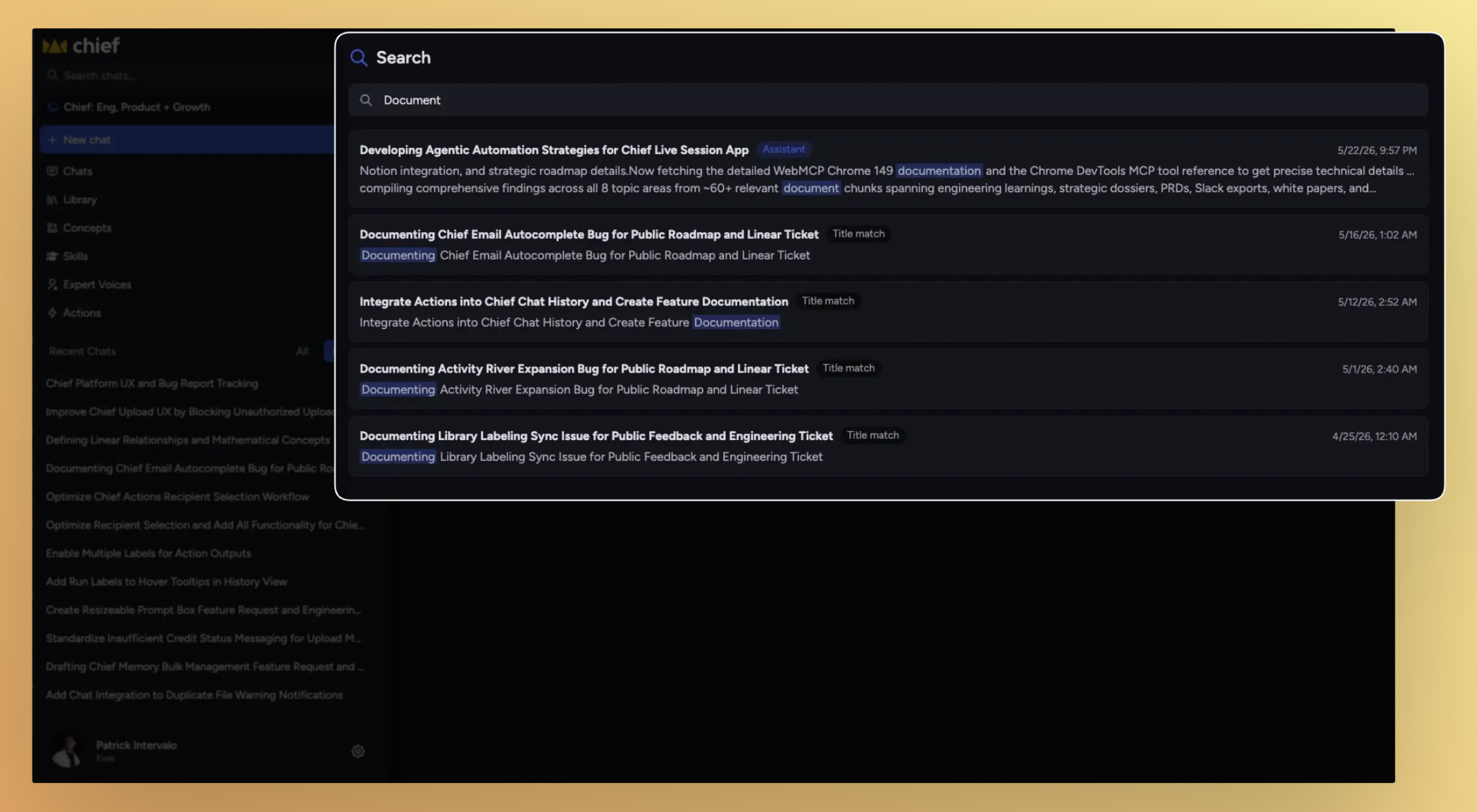
Chat Search now lets you search across indexed conversations using keywords, phrases, and chat titles, making it easier to revisit past work and bring previous context into new chats.
What’s new
Chat Search now allows you to:
Search across indexed conversations
Find both user prompts and assistant responses
Search using keywords or partial words
Open directly to the matching message in a chat
Search chat titles
@mention previous chats in a new conversation as context
Learn more: Chat Search
How it works
Chat Search indexes conversations and allows you to query them using keyword-based matching.
Search covers:
User messages
Assistant responses
Chat titles
Results are ranked based on:
Keyword relevance
Recency (with a boost for newer conversations)
Search behavior
Chat Search uses token-based keyword matching with prefix support.
Each search term matches as a prefix
Multiple words must all appear somewhere in the chat
Search is case-insensitive and punctuation-insensitive
Chat Search does not support:
Fuzzy matching
Synonyms
Stemming
Exact phrase matching
Results
Each result is labeled based on what matched:
Assistant → match found in an AI response
You → match found in a user message
Title → match found in the chat title
Clicking a result opens the chat directly to the matching message.
Access
Chat Search is available through the Search interface in Chief and works across indexed chats within your accessible Projects and organizations.